|
|
| |
|
File Scavenger® Version 7.1
|
|
| | |
| Advanced features in boldface require a premium or professional license. |
| Platforms |
Windows® 11/10/8/7 and Server 2025/2022/2019/2016/2012/2008. |
| Media |
Hard disks, SSDs, flash drives , RAID, RAIDZ, NAS and more. |
| Types of files |
All file types. |
| Causes of data loss |
Accidental file deletion. Removal from Recycle Bin, network drive.
Unbootable computer. Drive restored to factory settings.
Corrupted drive. Reformatted or deleted partition.
Crashed drive. Undetected drive.
Drive hanging, dropping offline intermittently.
Failed RAID, spanned, or NAS volume. |
| Recovered information |
Original filename, contents, folder path and dates. |
| File systems |
NTFS, FAT 32/16/12, exFAT, ReFS,
UFS1, UFS2, ext3, ext4, ext4 64-bit,
Btrfs,
XFS,
HFS+, HFSX,
ZFS, RAIDZ,
VMFS
|
| Virtual Disk |
VMware® VMDK,
Microsoft® VHD/VHDX,
Apple® SparseBundle
|
| Encryption |
BitLocker
|
| Languages |
English, Dutch, French, German, Italian, Japanese, Portuguese, and Spanish. |
| Other features |
Both dynamic and basic disks, Unicode filenames.
Compressed NTFS volumes, NTFS alternate data streams.
|
| Related Program |
Read and clone bad hard drives with Disk Recoup™. |
|
Data recovery for Windows®
|
| |
|
File Scavenger® Version 7 is a file "undelete" and data recovery utility for Windows® 11, 10, 8, 7, and Server 2025/2022/2019/2016/2008. File Scavenger® can recover files that have been accidentally deleted (including files removed from the Recycle Bin, in a DOS window, from a network drive, from Windows Explorer with the SHIFT key held down) provided that recovery is attempted before the files are permanently overwritten by new data. File Scavenger® supports both basic and dynamic disks, NTFS compression, alternate data streams, sparse files, Unicode filenames, etc. Except in severe cases, both the file and the folder path leading to the file can be recovered.
File Scavenger® can also recover files from a reformatted or corrupted volume even when the volume has been deleted and its original position and size are unknown. File Scavenger® can scan an entire physical hard drive to look for traces of defunct volumes.
File Scavenger® uses advanced algorithms to handle disks with bad sectors and badly corrupted partitions. It can be installed on a hard drive or run from a portable storage device such as a memory card, removable drive, or CD. To run File Scavenger®, you must log on as a system administrator to the computer where data recovery is intended.
Files can only be restored if the disk areas allocated to the files have not been overwritten by new data. All recovered files should be validated for the integrity of the recovered data.
|
|
Data recovery tool for Linux file systems
|
| |
|
File Scavenger® can recover data on a Linux formatted drive. However, the drive must be physically disconnected from its original host computer and plugged in to a Windows® computer with File Scavenger® installed.
Supported Linux file systems include UFS, ext, XFS, exFAT, BtrFS and ZFS. Data recovery from a corrupted instance of these file systems is usually successful. However, recovering deleted files is less likely due to the structures of the metadata.
|
|
Data recovery tool for macOS® file systems
|
| |
|
Similar to Linux, a macOS-formatted drive must be plugged in to a Windows computer with File Scavenger® installed.
Supported macOS® file systems are limited to HFS+ and HFSX. Data recovery from a corrupted instance of these file systems is usually successful. However, recovering deleted files is less likely due to the structures of the metadata.
|
|
File system snapshot fast browser
|
| |
|
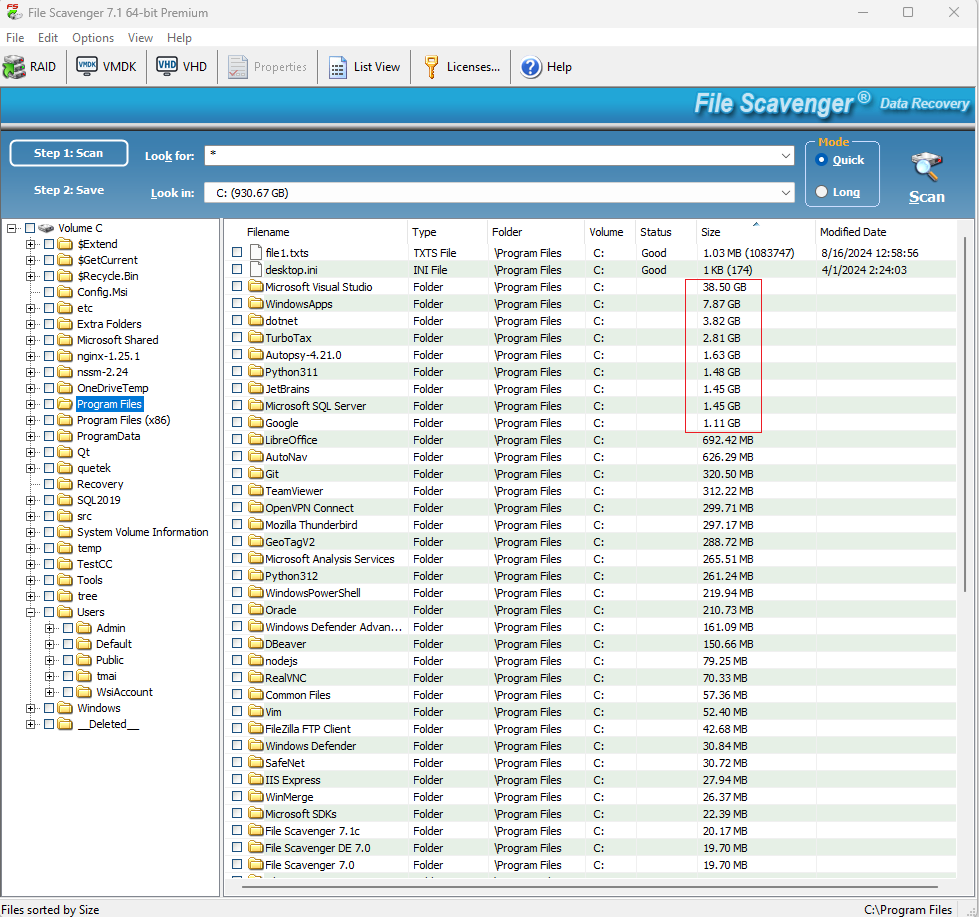
File Scavenger® can efficiently scan and navigate huge file systems holding hundreds of millions of files, an amount that can overwhelm other file management tools. It can search for files and show where disk space is being used. An example screenshot is shown below.
|
| | |
|
 |
|
Features
|
| |
|
Features in Version 7.1
- Multiple languages in the same installation.
- NTFS volumes with deduplication on Windows® Server.
- Improved recovery for ext4 and XFS file systems.
- ReFS up to version 3.7 (Windows® 11 and Server 2022).
- VMFS version 6.
- Faster (10x) tree-view navigation.
- Hex viewer with annotation for common file system structures.
- Early basic features of remote drive support.
- Displaying total data size under each folder.
- Directly scanning a disk image or VHD file found on an ext4 or NTFS volume.
- Showing data extents in file Property page.
- Many usability enhancements including recently used entries and display persistency
|
|
Licensing
|
| | |
|
| License
| Audience
| Usage
|
| Standard |
Typical users. |
Activation on 3 computers owned by the same person. |
| Premium |
Power users. |
Activation on 3 computers owned by the same person. |
| Professional |
Data recovery professionals. |
Use on any computer by the registered licensee regardless of computer ownership. |
| Company |
Special needs. |
Negotiable |
|
|